Reviews & Comparisons
BricsCAD V26 reviewed: a year of maturation

BricsCAD V26, released October 2025, is the version where Bricsys stops looking like the cheaper AutoCAD alternative. It is now the better-engineered platform in the workflows it has chosen to focus on. It is also the version where the limits of that strategy are most visible.
What V26 actually shipped
Bricsys released BricsCAD V26 on October 26, 2025. The current production build, V26.2, shipped March 31, 2026. It is now marketed under the Octave brand, following Hexagon’s corporate spin-off.
The product ships in five tiers: Lite, Pro, Mechanical, BIM, and Ultimate.
Perpetual licensing remains available alongside annual and three-year subscription options. Pricing as observed May 2026; vendor and reseller pricing varies.
The headline addition is Dynamic Block creation and editing. Before V26, BricsCAD could read and display Dynamic Blocks created in AutoCAD but could not author them natively.
V26 introduced a full BEDIT environment supporting visibility states, parameters, and actions. The feature remains marked experimental and is not available to users in the United States due to licensing restrictions.
V26.2 delivered the bulk of the cycle’s new capability. BricsCAD Assist, a new AI-driven documentation panel, shipped with V26.2 rather than V26.0.
So did PLM and PDM integrations with Siemens Teamcenter and Autodesk Vault. Cloud-collaboration connectors to Autodesk Construction Cloud and Bentley ProjectWise also shipped, alongside continued Dynamic Block improvements including constraint parameters and lookup tables.
The BIM and Mechanical toolsets received faster section performance, IFC export filters, local sheet metal repair, and associative title blocks.
BricsCAD’s established automation tools, Blockify and Auto-Parametrize, are not new to V26. Both have shipped since before V23 and continue to mature.
The same applies to the Quad cursor, whose machine-learning command prediction has run locally since its introduction. These features are part of the BricsCAD value proposition in this release, not V26-specific innovations.
The broader 2026 seat-license comparison across AutoCAD, BricsCAD, and DraftSight is covered separately in this site’s cornerstone breakdown. This review centres on what V26 does, not what it costs.
Where V26 closes a real gap
Dynamic Block authoring
Before V26, a BricsCAD shop that wanted to author a Dynamic Block had to open AutoCAD to do it. V26 removes that dependency.
The BEDIT environment in V26 supports visibility states, stretch and move actions, linear and polar parameters, and block tables. A user can now create a multi-configuration door block or a parametric furniture symbol entirely within BricsCAD for the first time.
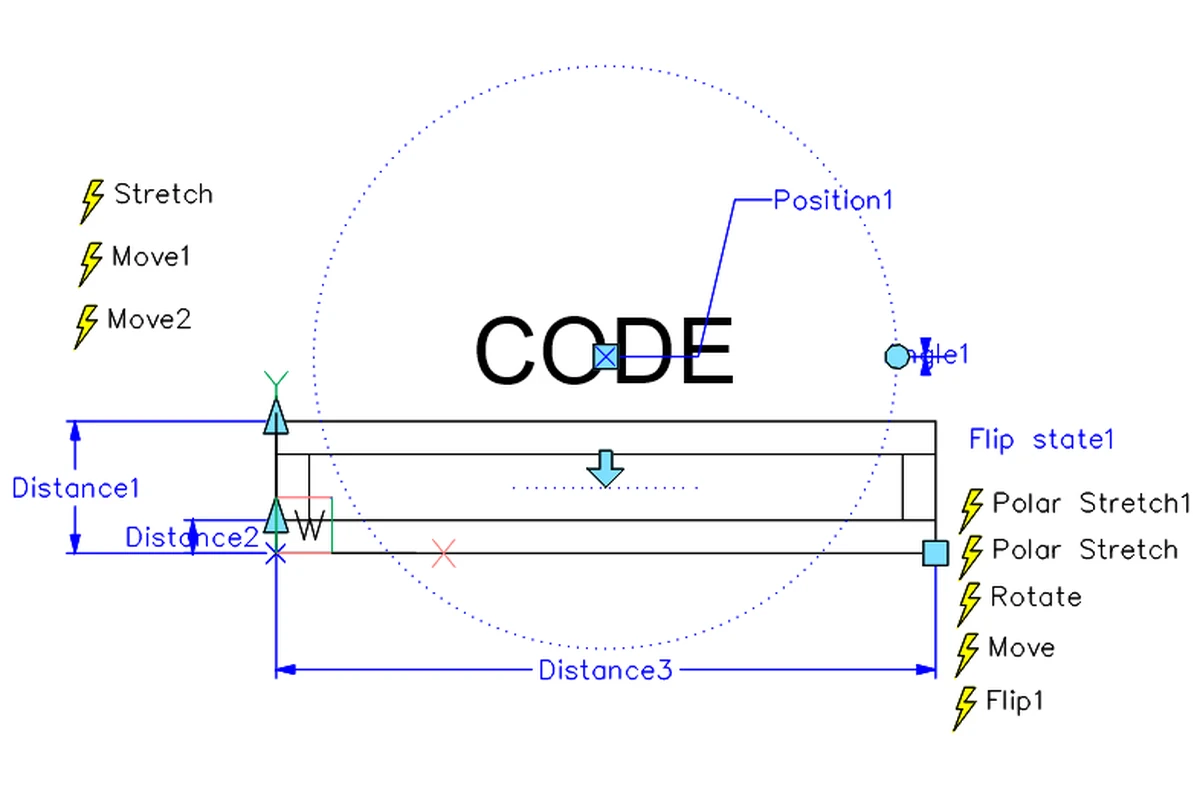
The qualifications matter. The feature ships under Experimental Mode: set the EXPERIMENTALMODE system variable to 1, then restart.
Attempt to edit a Dynamic Block before that, and BricsCAD displays a clear message: Editing of dynamic blocks is currently only possible in Experimental Mode.
It is also not available in the United States, where licensing restrictions block it entirely.
Constraint parameters and AutoCAD-style lookup tables remain partially supported. Bricsys’s own blog states the feature set “is not yet complete” (source 2).
An April 2026 forum thread on forum.bricsys.com reported a bug with the Tool Palette. Inserting a Dynamic Block caused existing blocks in the drawing to resize unexpectedly. The bug was unresolved at time of writing.
AutoCAD 2027 (R26.0) did not enhance its Dynamic Block surface. BricsCAD’s parity target is not a moving goalpost. The comparison is against AutoCAD’s long-standing Dynamic Block toolset, unchanged in the March 2026 release (source 5).
For the subset of Dynamic Block operations V26 supports, parity is credible. For the full surface, including constraint parameters and the stability expected of production software, the claim is aspirational.
Quad cursor and the productivity claim
BricsCAD’s Quad cursor surfaces context-sensitive commands in a floating menu tied to the entity under the pointer. A machine-learning model, shipped with the BricsCAD installation, ranks commands by predicted relevance to the user’s workflow. The model runs locally and adapts to session data without cloud connectivity (source 4).
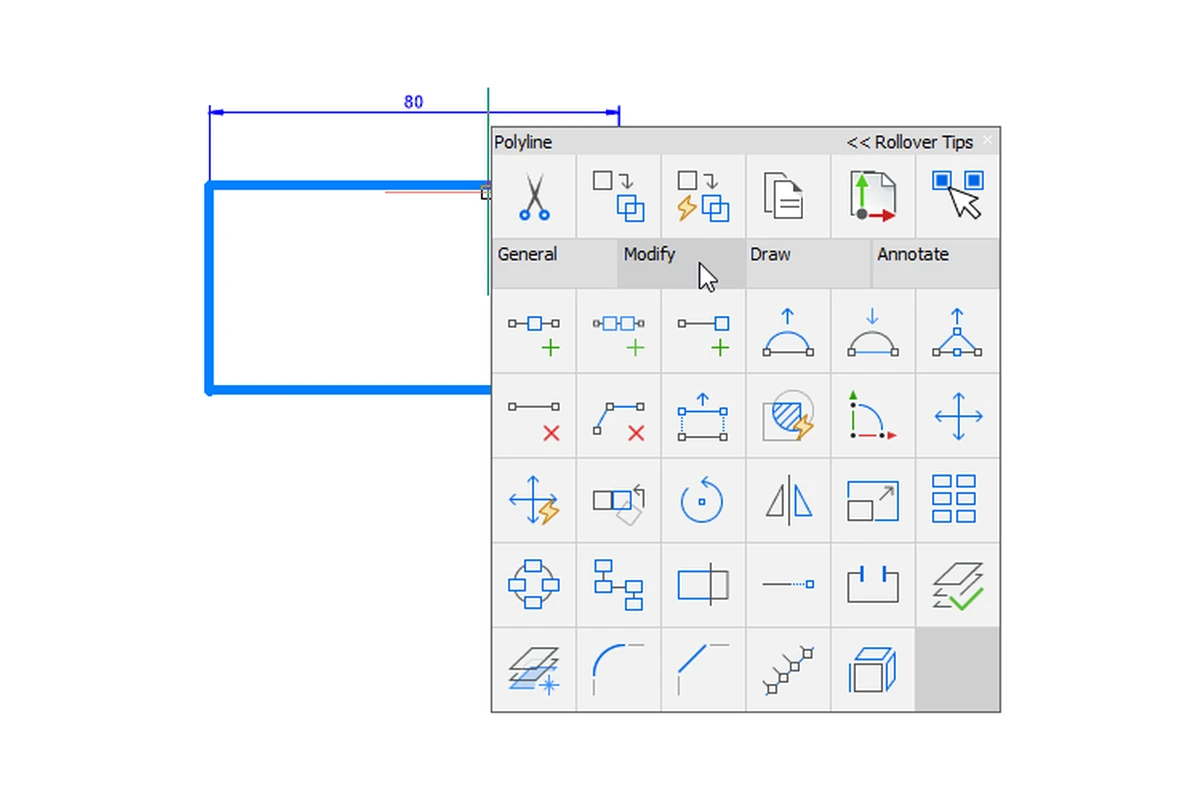
Reseller-reported metrics claim that polyline editing tasks that took 15 to 20 seconds drop to 3 to 4 seconds with the Quad. Multiplied across a typical design day, the claimed saving is several hours weekly. These figures come from a BricsCAD reseller (NORI CAD, January 2026) reporting on a 15-engineer firm, not from independent benchmarks.
The Quad is a genuine productivity tool for repetitive, entity-type-consistent work. It is not a universal accelerator. Drafters working across mixed templates, standards, and entity types will see a smaller delta.
AutoCAD users transitioning to BricsCAD face a learning curve with the Quad. It is a different interaction paradigm, and the first week is slower, not faster.
The productivity claim survives contact with a real drafting workflow. It does not survive the marketing register in which it is usually presented.
Embedded-local AI: Blockify and Auto-Parametrize
Blockify scans a drawing for geometrically identical entity groups and replaces them with shared block references. Auto-Parametrize (PARAMETRICBLOCKIFY) extends this by finding parametrically similar geometry (same topology, different dimensions) and converting matches into editable parametric blocks.
Both are deterministic geometric pattern-matching tools. Bricsys markets them under the “AI” label, but the mechanism is algorithmic search-and-replace, not neural inference.
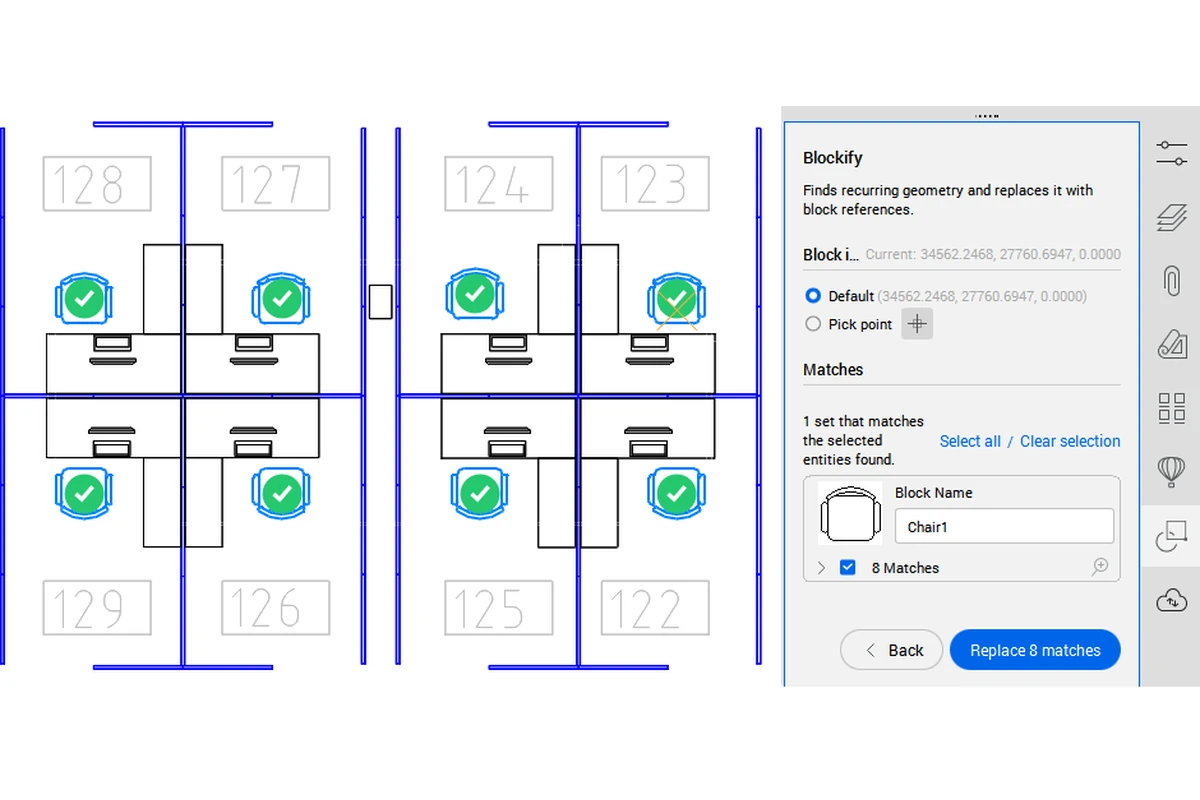
The architectural choice is what matters for this review. These tools run locally, on the user’s machine, with no cloud round trip. They execute in seconds on current-generation hardware.
They work on air-gapped networks and in regulated environments where drawing data cannot leave the building.
AutoCAD 2027 took a different path. The Autodesk Assistant, shipping as a tech preview, embeds an MCP client that connects to cloud-based language models for conversational CAD standards validation (source 5).
MCP, covered in this site’s earlier piece on the protocol’s arrival in CAD, enables runtime tool discovery and natural-language querying against the open drawing. The Autodesk approach requires network connectivity, an Autodesk account, and comfort with drawing data traversing vendor infrastructure.
Neither approach “wins” in the abstract. Embedded-local intelligence fits closed-network shops, regulated environments, and firms that want automation without a cloud dependency. MCP-connected intelligence fits shops already running cloud-connected toolchains, comfortable with Autodesk’s platform, and wanting conversational querying over their drawings.
The choice is architectural, not qualitative. AutoCAD 2027’s cloud-first repositioning, covered separately in this site’s 2027 review, makes this divergence structural rather than incidental.
Where V26 does not close the gap
Vertical toolsets
An AutoCAD subscription includes the Architecture, MEP, Mechanical, Electrical, Plant 3D, Map 3D, and Raster Design toolsets. Civil 3D ships as a separate product. BricsCAD has no first-party equivalent to Plant 3D, MEP, or the full Civil 3D feature set.
BricsCAD offers a Survey toolset that handles TIN surfaces, point clouds, LandXML, and field-to-finish workflows. It is a surveying and staking tool, not a corridor-modeling and grading-design platform.
Third-party applications partially fill the gap: Aplitop’s TcpMDT extends BricsCAD toward civil engineering, and Hexagon’s CADWorx covers process-plant piping. These are paid add-ons from separate vendors, not included capabilities.
For a firm whose production work runs through a vertical toolset, BricsCAD is not a substitute. This is not a criticism of V26. It is a structural fact about where Bricsys has and has not chosen to compete.
AutoCAD ecosystem integration
BricsCAD reads .dwg files natively and claims fidelity at the file level. The switching cost does not live in the file format. It lives in the ecosystem around the file.
LISP routines accumulated over decades mostly run in BricsCAD without modification.
The breakage points are specific. Application object name strings need rewriting: vlax-get-object "AutoCAD.Application" becomes vlax-get-object "BricscadApp.AcadApplication". Effective block-name handling for Dynamic Blocks needs care, as do routines targeting AutoCAD-specific object models (source 9).
Most standard routines transfer cleanly, including widely used Lee Mac functions (source 8).
Third-party application compatibility is thinner. Bricsys claims approximately 1,200 application providers in its catalog. The Autodesk App Store is substantially larger, and major vertical tools (Trimble SysQue, most Navisworks-integrated clash tools) have no BricsCAD port.
Firms embedded in Autodesk Construction Cloud or Forma have no direct BricsCAD pathway to those platforms. Bricsys is not an Autodesk Platform Services partner.
Revit-to-BricsCAD workflows are one-way. BricsCAD BIM imports RVT and RFA files (Revit 2015 through 2025), but there is no round-trip back to Revit’s native format.
The migration tax not in the price tag
The licence cost is the visible number. The invisible cost is workflow migration.
Custom CUI files and toolbar arrangements do not transfer reliably. Forum reports on the Bricsys community forums document that even the V25-to-V26 settings wizard fails to preserve screen layouts for some users.
Manual copying of CUI files and startup scripts (on_doc_load.lsp, on_start.lsp) is the documented workaround. Profile Manager exists but profiles have been reported to revert after restart.
ObjectARX-targeting plug-ins require recompilation. BricsCAD’s BRX API is source-compatible with ObjectARX at the C++ level, meaning a developer can compile one source tree against either SDK.
Binary .arx files compiled for AutoCAD will not load in BricsCAD. For firms relying on third-party ObjectARX plug-ins whose developers do not ship a BRX build, this is a hard blocker.
Training time is the softest number. Vendor and reseller sources claim hours to basic productivity.
The AUGI review by Jim Coppinger put it plainly: “most AutoCAD users can sit down in front of a BricsCAD system and start working with almost no training at all” (source 8). Forum evidence supports this for simple workflows.
For shops with deep customization, the audit-and-rebuild cycle is measured in days to weeks per power user, not hours. CUI files, LISP libraries, and plug-in compatibility all need review.
V26.2 mid-cycle changes worth flagging
V26.2 is not a patch release. It is a material feature drop that shipped the majority of the V26 cycle’s new capability.
The features that shift the verdict are the integration connectors. Autodesk Construction Cloud and Bentley ProjectWise connectivity, new in V26.2, address a standing complaint against BricsCAD. The product could not previously participate in the cloud-based common data environments large project teams use as default.
Siemens Teamcenter and Autodesk Vault integrations extend the same logic to PLM and PDM workflows in the Mechanical tier.
BricsCAD Assist, the AI documentation panel, is a V26.2 addition. It provides in-product help and how-to guidance without leaving the drawing environment.
It is scoped narrower than Autodesk’s Assistant: documentation queries rather than drawing-level conversational AI. It still fills a gap BricsCAD previously covered only through the external help site.
The Octave branding that arrived alongside V26.2 is corporate restructuring, not product news. The software, the licensing, and the support channels are unchanged.
For pure 2D drafting shops already on V26.0, the V26.2 update is incremental. For BIM and Mechanical users, and for any firm evaluating BricsCAD’s cloud-collaboration story, V26.2 is the release where the cloud and PLM connectors finally make the upgrade worth the maintenance window.
The verdict
Existing BricsCAD users on V24 or earlier should upgrade now. The accumulated improvements across two version cycles, including Dynamic Block authoring, are worth the maintenance or upgrade cost. Existing V25 users whose workflows do not depend on Dynamic Block creation or the new PLM/PDM integrations can wait for V27 without losing ground.
Small-to-mid shops evaluating a switch from AutoCAD should trial V26 seriously. The case is strongest for firms with the right profile: straightforward 2D/3D DWG workflows, no vertical-toolset dependency, no Autodesk Construction Cloud lock-in, and a preference for perpetual licensing or local-first AI. These firms will find BricsCAD V26 a credible production platform, not a budget compromise.
Firms dependent on AutoCAD verticals (Civil 3D, MEP, Plant 3D), embedded in Autodesk’s cloud ecosystem, or carrying deep ObjectARX plug-in investments should hold. V26 does not close those gaps, and no BricsCAD release on the current product roadmap has signaled an intent to.
The broader read: V26 confirms that Bricsys, now operating as Octave, is building a platform that competes on engineering depth in its chosen workflow slices rather than on breadth. If your work lives in those slices, that depth is exactly what you get; if it does not, no amount of polish closes the vertical-toolset and ecosystem gaps.
Whether that focus can keep pace with Autodesk’s cloud-and-subscription push is the bet you are making when you buy in, and V27 is where it gets tested.
What this review does not cover (and why)
This review centres on BricsCAD Pro and DWG-centric drafting workflows. It does not evaluate BricsCAD BIM at the full building-authoring scale where ArchiCAD and Revit are the primary competitors.
It does not cover several adjacent areas: the Communicator data-exchange add-on, the Mac and Linux builds, the educational licence programme, and the V26 Survey toolset beyond its mention in the vertical-toolset discussion.
V27 speculation is excluded. The single forward-looking note in the verdict (“wait for V27”) is based on the V25-to-V26 delta, not on unpublished roadmap information.
Sources
- Bricsys, “BricsCAD V26: The True CAD Alternative, Now Smarter and More Scalable Than Ever,” bricsys.com, October 26, 2025.
- The Octave BricsCAD Team, “Create and Edit Dynamic Blocks in BricsCAD V26,” bricsys.com, February 19, 2026.
- Octave BricsCAD, “Octave BricsCAD V26.2 Release Introduces 30 New and Enhanced Features,” bricsys.com, March 31, 2026.
- The Octave BricsCAD Team (Mark Tooley and Julie Keverian), “Inside Octave BricsCAD’s AI: 10 Questions, 10 Straight Answers,” bricsys.com, March 12, 2026.
- The AutoCAD Team, “AutoCAD 2027: Redefining How You Create, Collaborate, and Deliver,” autodesk.com/blogs/autocad, March 25, 2026.
- Between the Lines Blog, “Autodesk AutoCAD 2027 and Civil 3D 2027: Key Updates Explained,” btl-blog.com, April 2, 2026.
- DE Editors, “BricsCAD V26 Now on the Shelves,” Digital Engineering 24/7, digitalengineering247.com, October 16, 2025.
- Jim Coppinger, ZenTek Consultants, “BricsCAD Review,” AUGI (augi.com), July 2023.
- Roy Klein Gebbinck (user), “Compare AutoCAD LISP code to BricsCAD,” forum.bricsys.com, August 2023.